From drawings and supplier rates to a quotation you can send.
PRODUCT EXAMPLES / OPEN AND INSPECT
See the work. Before you sign up.
Concrete inputs, visible calculations and an output you can inspect. These are labelled sample jobs, with no customer data.
QUOTE / ACTUAL PDF EXPORT
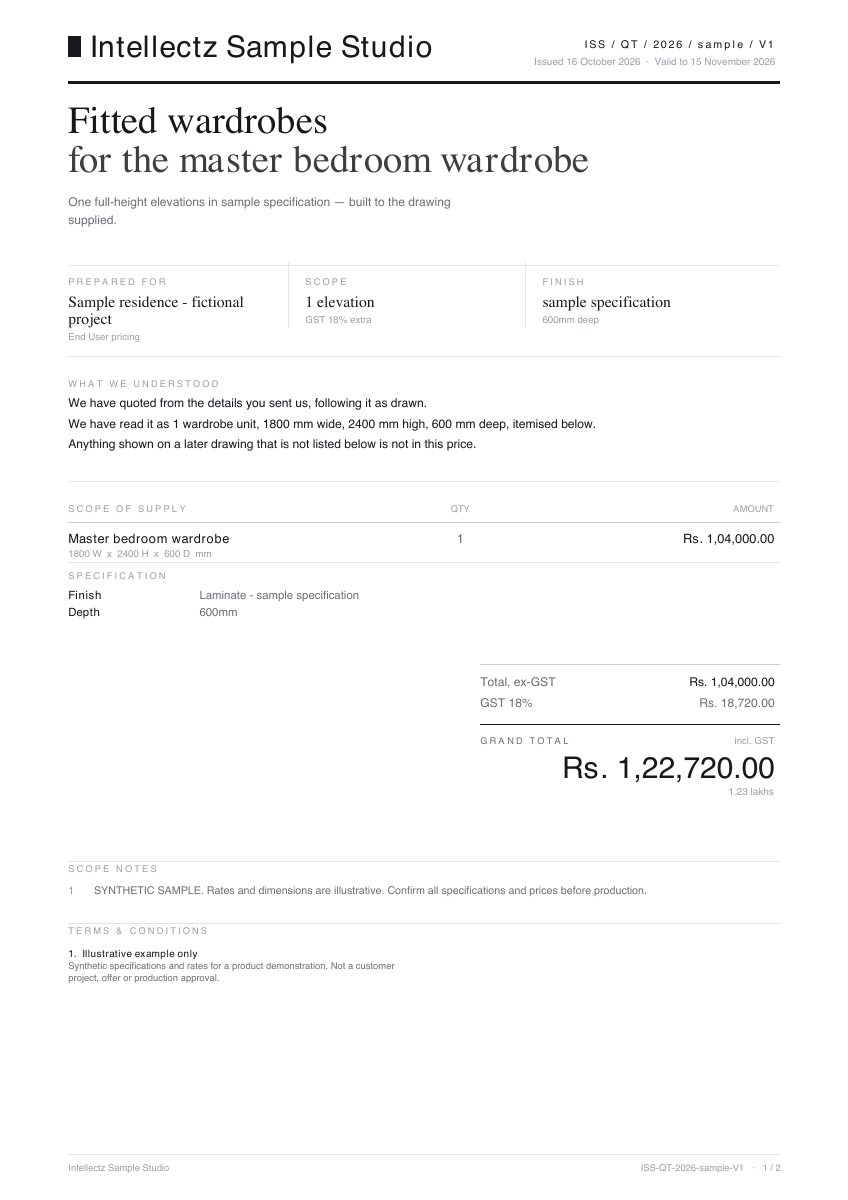
A wardrobe. A clear commercial document.
Input: one 1,800 × 2,400 × 600 mm wardrobe, a laminate specification and illustrative pricing. Output: itemised scope, dimensions, tax, total and terms.
Generated with Quote’s production PDF renderer from synthetic inputs. This demonstrates the export, not an AI extraction or a completed customer project. ₹1,04,000 + ₹18,720 GST = ₹1,22,720.
Open the product from your Intellectz account. Start with a real job, drawing or document that you have permission to use.
02 / REVIEW
Check the details.
Review the product’s inputs, output and access limits. Resolve uncertain details before using the result in production or making a commercial commitment.
03 / NEXT STEP
Keep work moving.
Return to the shared workspace to open related products and manage access. Each product keeps the workflow and permissions appropriate to its work.